How to Start a Print-on-Demand Phone Case Business
Learn how to start a print-on-demand phone case business, choose models, prepare artwork, approve samples, price products, and plan fulfillment without bulk inventory.
Direct Answer
The short version
You can start a print-on-demand phone case business without buying bulk inventory by choosing one audience, selecting a small range of eligible phone models, preparing model-specific artwork, ordering samples, and publishing a focused collection. When a customer orders, a POD supplier produces, checks, packs, and ships the case. The model lowers upfront inventory risk, but it does not remove the need to test products, calculate costs, confirm channel and route support, or set realistic delivery expectations.Is A Print-On-Demand Phone Case Business A Good Fit?
Phone cases can be a practical first POD category because the product is familiar, visual, lightweight, and suitable for repeat design collections. They can work for artists, creators, small brands, fan communities, and niche stores that already have a clear visual point of view.
The operational tradeoff is device fragmentation. A “phone case” is not a single SKU. Every device model, case construction, finish, and print area can create another variant. Artwork that fits one camera layout may need adjustment for another. A large catalog can therefore create more maintenance and support work than a beginner expects.
This business model is a better fit when you can:
- Create several related designs for one identifiable audience.
- Start with a limited device and case range.
- Review samples before scaling traffic.
- Explain production and delivery separately.
- Leave enough margin for support, discounts, and mistakes.
It is a weaker fit when the offer depends on every device model being available immediately or when the selling price leaves no room for production, shipping, platform fees, and customer service.
Step 1: Pick A Specific Buyer Before You Pick Designs
Start with a buyer group, not a folder of unrelated graphics. A focused audience gives you a reason for each design, a clearer product page, and a more useful way to test demand. Examples include a gaming community, pet owners, podcast listeners, an artist’s audience, a local brand, or a creator with a recognizable visual identity.
Ask three questions:
- Who would recognize the design instantly?
- Would they want it on a phone case, not just on a poster or shirt?
- Can you create several related designs for the same audience?
If the answer is yes, you can build a small collection instead of relying on one isolated design. A collection also makes it easier to compare which themes, colors, and messages attract clicks or orders.
Avoid starting with a broad label such as “funny cases” or “aesthetic cases.” Narrower positioning gives the customer a reason to choose your store instead of a generic marketplace listing.
Step 2: Choose Case Types And Models Carefully
Phone case fulfillment depends on the exact product. Some phone models, materials, colors, finishes, or print methods may not be available through every production location or route. Before building listings, review the current PODJST phone case range and confirm the variants you can actually support.
For a first launch, keep the offer simple:
- Choose the phone models that matter most to your audience.
- Start with one or two case constructions.
- Use a small, coherent design collection.
- Avoid promising every device generation.
- Confirm product availability before publishing.
- Treat local production and delivery estimates as route-dependent.
This keeps the store easier to maintain and reduces the chance of selling an unavailable or poorly matched variant. It also makes customer support simpler because the product differences are easier to explain.
When comparing suppliers, use a repeatable scorecard rather than choosing only by base cost. The phone case supplier selection guide explains the product, printing, inspection, packing, routing, and support questions worth checking.
Step 3: Prepare Artwork For UV Printing
Phone case artwork needs more than a square image. It has to account for camera cutouts, curved edges, safe areas, bleed, and model-specific templates. If UV printing is used for an eligible product, the file should be prepared at the requested resolution and checked for placement, contrast, and small details.
A good production check includes:
- File dimensions and resolution
- Safe area and bleed
- Color contrast
- Text size and readability
- Camera and button cutouts
- Important elements near curved edges
- Transparent background behavior, where relevant
Review the artwork requirements for each supported phone model before adapting one design across multiple models. If the artwork includes small text, thin lines, faces, or detailed patterns, inspect a physical sample before treating it as a hero product.
Do not assume a mockup proves print quality. A mockup shows the intended look; a sample helps reveal real placement, color, edge behavior, and product feel.
Step 4: Order Samples And Approve The Product
Sampling is part of product development, not a decorative extra. It is the point where the digital design meets the actual case. Review the sample as both a seller and a customer.
Check:
- Print clarity and color
- Artwork placement around the camera and edges
- Product condition and surface finish
- Fit for the intended device model
- Packaging condition
- Whether the product photographs well
The phone case fulfillment guide explains how printing, inspection, packing, and shipping fit together. Supplier checks do not replace your own sample approval, especially for the products used in ads or creator content.
Step 5: Build A Focused Store And Channel Workflow
New sellers often publish too many products too quickly. A tighter launch is easier to review, price, photograph, and test. Start with roughly 5 to 12 related designs rather than a giant catalog with no clear audience.
Each product page should answer:
- Which phone model and case type the buyer is selecting
- What is printed and what is not
- How the final product may differ from a digital preview
- When production begins
- How delivery estimates are presented
- What happens if the buyer selects the wrong model
Choose a channel that fits how you plan to acquire customers. A branded store may suit a creator or online brand, while a marketplace may help test search-driven demand. Review the current Shopify workflow or Etsy workflow before promising automatic publishing or order syncing. Connection methods and supported features can change.
Step 6: Price With Landed Cost In Mind
Do not price a phone case by copying another store. Your minimum viable price depends on the full cost of fulfilling and supporting the order.
Use this planning formula:
Retail price − product cost − shipping − platform and payment fees − discounts − expected support cost = estimated contribution margin
Review:
- Base product and printing cost
- Shipping charged by the fulfillment route
- Marketplace, store, and payment fees
- Taxes or duties that may apply
- Discount and promotion room
- Replacement, return, and support risk
- Ad or creator-acquisition cost
The PODJST pricing page can support cost planning, but any margin is an estimate rather than a guaranteed result. Recalculate when the product, route, destination, platform fee, or promotion changes.
Step 7: Define The Fulfillment Promise
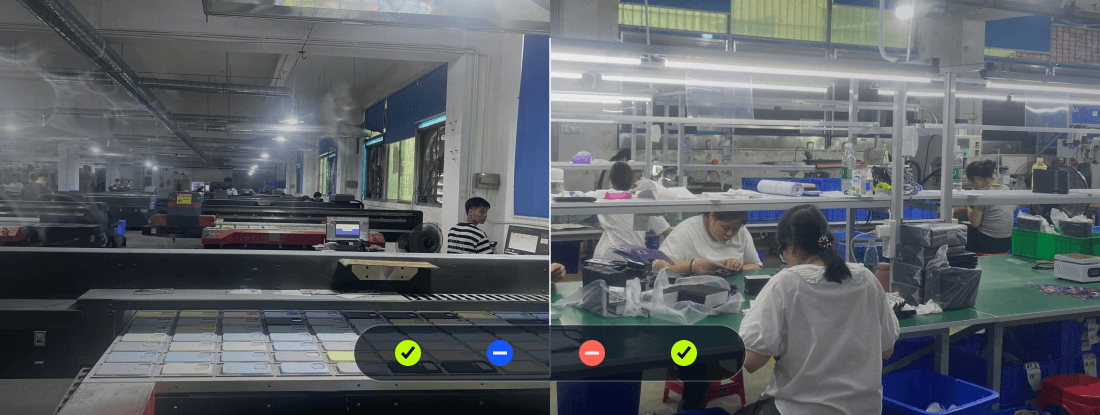
Print-on-demand orders are produced after purchase, so customers should understand that production and delivery are separate steps. For eligible products on supported routes, PODJST can help route production through its multi-country network, but timing depends on artwork readiness, product availability, order volume, carrier capacity, and destination.
Good product pages should explain:
- When production starts
- What affects production time
- What affects delivery after shipment
- Which destinations are supported
- How customers receive tracking, where available
Use the PODJST fulfillment overview to understand production, quality checks, packing, and shipping as separate stages. Do not advertise a fixed arrival date unless the product, destination, capacity, and carrier route have been confirmed.
Clear expectations reduce preventable support requests and help the store feel more professional.
A Lean Seven-Day Launch Plan
You do not need to finish an entire brand in one week. The goal is to complete one small, reviewable launch cycle.
- Day 1: Define the audience. Write a one-sentence description of the buyer and choose one collection theme.
- Day 2: Confirm products. Select the initial phone models and case types.
- Day 3: Prepare artwork. Adapt the design to each template and check safe areas.
- Day 4: Request or review samples. Record print, fit, placement, and packaging issues.
- Day 5: Build listings. Add clear titles, model choices, product details, and realistic expectations.
- Day 6: Calculate costs. Set a retail price with shipping, platform fees, promotions, and support room included.
- Day 7: Soft launch. Publish to a small audience, collect questions, and fix unclear parts before increasing traffic.
For a structured beginner path, use PODJST POD University alongside the product and fulfillment documentation.
Common Beginner Mistakes
- Uploading one file to every model without checking camera and edge placement
- Listing too many device variants before confirming availability
- Treating mockups as proof of physical product quality
- Choosing a supplier only by base price
- Ignoring shipping, platform fees, replacements, and discounts
- Promising a production or delivery speed that depends on route conditions
- Launching random designs without a defined audience
- Scaling ads before approving samples and customer-facing details
Next Step
Browse the current PODJST phone case range, choose a small set of supported models, and prepare the artwork for each supported model. Confirm the sample, channel workflow, costs, and fulfillment route before publishing the first collection.
FAQ
Common questions
Is a phone case business good for beginners?
It can be. Phone cases are familiar products and can be produced after a customer orders, but beginners still need to confirm eligible models, prepare model-specific artwork, approve samples, calculate costs, and avoid delivery promises they cannot control.
Do I need inventory to sell phone cases?
No bulk inventory is required when you use a print-on-demand model. The case is produced after an order is placed. You still need to manage product setup, artwork, listings, pricing, customer expectations, and support.
How many phone case designs should I launch with?
A small collection is easier to test than a large catalog. Five to 12 related designs can be enough for an initial launch, provided each design is adapted to the supported case models and reviewed before scaling.
Should I order samples before selling?
Yes. Samples help you review print clarity, artwork placement, case condition, model fit, packaging, and photography. A digital mockup cannot verify those physical details.
Can I connect Shopify or Etsy?
PODJST provides supported channel workflows, but connection methods and features should be confirmed before launch. Review the current Shopify or Etsy channel page rather than assuming every publishing and sync feature is available for every product.
Can PODJST fulfill phone case orders locally?
PODJST can support production through its USA, Canada, Germany, Spain, or China network where available. A local or closer-to-buyer route depends on the eligible product, destination, capacity, and current route support.